Windows 10
659 Topics
You're Not Up To Date
Hello, I've just re-installed Windows 10. I applied Windows Update a few times. I applied Optional Updates I enrolled in Extended Windows Security Update. But I still get "Your device is missing important security and quality fixes" after clicking "Check for updates". Any help would be greatly appreciated.5Views0likes1Comment
Biometrics - Some of these settings are hidden or managed by your organization
-When going in windows to ->Sign ins-> I am unable to set biometrics. *Some of these settings are hidden or managed by your organization. for e.g. Windows Hello Face This option is currently unavailable - Click to learn more -To try and solve this issue, I enabled Windows Hello for business from Intune -> Device -> enrollment -> Windows hello for business. But issue persists, What do you think could be the issue.423Views0likes3Comments
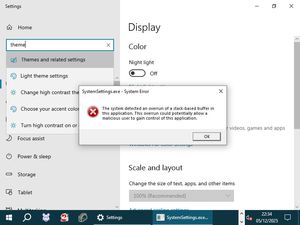
Windows Themes no longer working...
Hello folks, I hope someone here can help me out: My Windows Themes suddenly stopped working. I can select all other categories under "Personalize", but clicking on "Themes" results in the application crashing (i.e., the window closing) and a SystemSettings.exe dump file being created. Upon booting into Safe Mode, I got a direct error message that I screenshot: How can I easily fix this without resorting to unwanted measures such as a system restore or having to create a brandnew user profile? Thanks in advance. <363Views0likes1Comment
Windows 10 11 Enterprise Restrict access to MS Store via group policy
Issue presented: Multiple users are downloading and installing Remote Access tools that are deemed not supported as well as other applications in the environment. We want to restrict access to the MS Store to Administrators or a specific AD group without using AppLocker or InTune. I have seen various threads in multiple sources that are conflicting about disabling the store or setting to the Company Portal for Windows 10/11. If you set the MS Store to Company Portal, in Windows 11 it disables the store. Turn off the Store application GPO: Denies or allows access to the Store application. If you enable this setting, access to the Store application is denied. Access to the Store is required for installing app updates. Other threads as well as the gpo verbiage itself indicate that if you disable the store, all installed applications will no longer update. There are some threads that state the opposite. https://learn.microsoft.com/en-us/windows/configuration/store/?tabs=gpo Has anyone configured a way to restrict users or a specific group of users from using the MS Store while allowing existing applications the ability to update?23Views0likes0Comments